An email signature may seem like a small part of a business email, but it can have a significant impact on how a message is perceived. Every email sent by a company is an opportunity to reinforce its identity, provide useful contact information, and create a consistent experience for customers, partners, and employees. The way a signature is designed can affect readability, accessibility, branding, mobile compatibility, and even whether important information remains visible to the recipient.
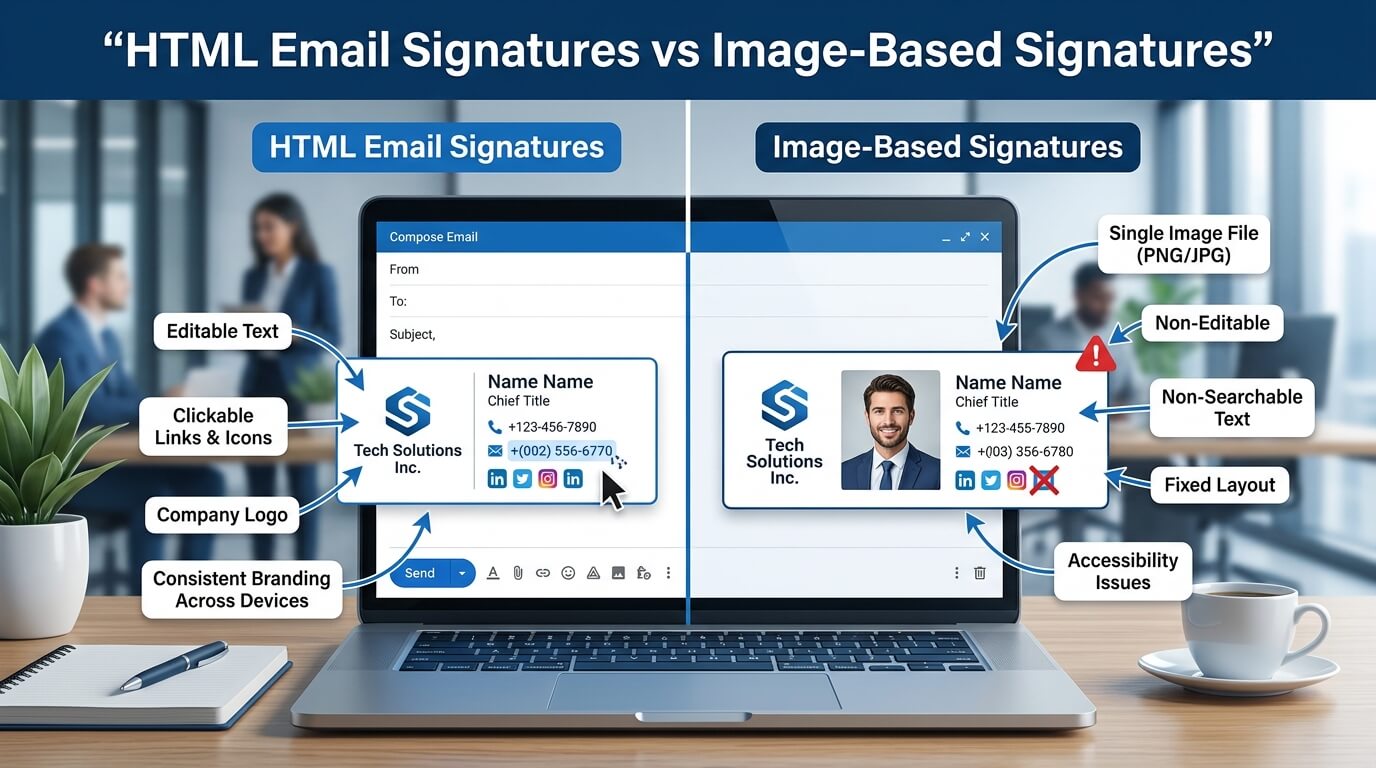
Two common approaches are HTML email signatures and image-based signatures. An HTML signature uses editable text, links, images, and formatting to create a structured signature. An image-based signature, by comparison, places most or all of the signature information inside a single graphic or image file.
Both approaches can produce visually attractive results, but they work very differently. Understanding those differences is important for businesses that want professional-looking emails without sacrificing usability. An attractive signature is not necessarily an effective one, and the best choice depends on factors such as branding requirements, accessibility, device compatibility, maintenance, and the type of information included.
Understanding HTML Email Signatures
What Is an HTML Email Signature?
An HTML email signature is a formatted signature created using HTML elements and styling. Instead of turning the entire signature into one image, it separates different components such as the person’s name, job title, company name, phone number, website, social media links, and logo.
For example, a company logo can remain an image while the employee’s name and contact details remain actual text. Website addresses can be clickable links, telephone numbers can be formatted for mobile users, and social media icons can link directly to company profiles.
This approach gives businesses considerably more control over how information functions inside an email. The signature can look polished while still behaving like normal email content.
Why Businesses Use HTML Signatures
HTML signatures are widely used because they combine branding with practical functionality. A company can establish a consistent visual identity while making essential information easy to read, copy, click, and access.
Another important advantage is flexibility. If an employee changes their phone number, job title, or department, the relevant text can be updated without redesigning the entire signature as an image.
HTML signatures can also accommodate responsive layouts. Since emails may be opened on desktops, laptops, tablets, and smartphones, the signature can be structured to adapt to different screen sizes.
Understanding Image-Based Email Signatures
What Is an Image-Based Signature?
An image-based signature is usually designed as a graphic in software such as Photoshop, Illustrator, Canva, or another design application. The finished artwork is then inserted into an email as an image.
This method can produce highly controlled visual results because the designer determines exactly how every element appears within the graphic. Fonts, colors, spacing, icons, borders, and other design elements remain fixed within the image.
For businesses that prioritize visual consistency, this can initially appear attractive. The problem is that everything contained within the image is essentially one graphic rather than individual pieces of usable email content.
If a person’s name, job title, phone number, and website are all included in the image, the recipient may not be able to select and copy those details individually. Links also cannot function naturally unless separate clickable areas are added around the image.
Why Image-Based Signatures Are Still Used
Image-based signatures continue to appear in professional emails because they are relatively easy to design. A graphic designer can create one polished visual and distribute it to employees without needing to understand HTML email development.
They can also preserve a precise visual appearance across environments that support image display. However, this advantage can be misleading because email clients do not always display images automatically.
An image-based signature can therefore look perfect in the design file while appearing incomplete or unhelpful in the recipient’s inbox.
HTML Email Signatures vs Image-Based Signatures
The fundamental difference is that an HTML signature treats the signature as structured email content, while an image-based signature treats it primarily as a visual asset.
| Feature | HTML Email Signature | Image-Based Signature |
| Text readability | High | Depends on image rendering |
| Clickable links | Easy to implement | Requires additional setup |
| Mobile adaptability | Can be responsive | Often less flexible |
| Accessibility | Better when properly coded | Limited |
| Updating contact details | Relatively easy | Requires image editing |
| Text copying | Usually possible | Usually not possible |
| Branding control | High | Very high visually |
| Image blocking impact | Usually limited | Potentially significant |
| SEO value | Limited but usable links | Minimal |
| Maintenance | Easier at scale | More difficult over time |
Neither format is automatically suitable for every situation, but the differences become especially important when a company sends thousands of emails every month.
The Role of Branding in Email Signatures
HTML Allows Branding Without Turning Everything Into an Image
A common reason businesses choose image-based signatures is the desire for precise branding. Companies may want specific fonts, colors, logos, icons, and layouts to appear consistently.
HTML can still provide strong branding without converting the entire signature into a graphic. A company logo can be included as an image, while surrounding information remains live text.
This creates a useful balance. The visual identity remains recognizable, but important information remains accessible and functional.
Image-Based Signatures Offer Visual Precision
An image can provide greater control over exact visual positioning. Every letter, icon, shape, and color can be placed exactly where the designer wants it.
However, this precision comes at a cost. The recipient does not receive a flexible collection of text and links. They receive an image.
For a promotional banner or decorative element, that may be acceptable. For essential contact information, it can create unnecessary limitations.
Accessibility Considerations
Why Accessible Signatures Matter
Professional communication should be usable by as many recipients as possible. Some email users rely on screen readers or other accessibility technologies to understand digital content.
HTML signatures can be designed with accessibility in mind. Text can remain actual text, images can have appropriate alternative descriptions, and links can use meaningful labels.
An image containing a person’s entire contact information may not communicate that information effectively to someone using assistive technology. If the image does not have appropriate alternative text, the recipient may receive little or no useful information from the signature.
Text Is More Flexible Than Text Inside an Image
Live text can be enlarged, selected, copied, translated, or interpreted by accessibility software. Text embedded in an image does not offer the same flexibility.
This distinction becomes increasingly important as businesses communicate with larger and more diverse audiences. Accessibility is not simply a technical concern; it can influence whether recipients can actually use the information being provided.
Mobile Compatibility and Responsive Design
Email Signatures Must Work on Small Screens
Many professionals read emails on smartphones. A signature that looks excellent on a large desktop screen can become difficult to use when viewed on a smaller display.
HTML signatures can be structured to respond to available screen space. Text can wrap naturally, columns can stack, and spacing can be adjusted for smaller displays.
Image-based signatures are more dependent on their original dimensions. A wide signature graphic may shrink significantly on a mobile screen, forcing recipients to zoom in to read contact information.
Mobile Users Need Functional Contact Details
A professional signature should make it easy for someone to contact the sender. Phone numbers should be readable, websites should be accessible, and important links should be easy to tap.
HTML makes these interactions much more straightforward. A phone number can be formatted as a telephone link, while an email address can be clickable.
With an image, the recipient may have to manually type the phone number or website address into another application.
Email Client Compatibility
Different Email Platforms Render Content Differently
One of the biggest challenges with HTML email is that email clients do not all interpret HTML and CSS in exactly the same way. Developers therefore need to use email-friendly techniques rather than relying on every modern web design feature.
Despite these challenges, carefully built HTML signatures can work reliably across major email environments.
Image-based signatures avoid some HTML rendering issues because the visual design is contained inside the image itself. However, they introduce other problems, particularly when images are blocked or fail to load.
Images May Not Always Appear
Some email clients or security settings can prevent external images from loading automatically. When that happens, an image-based signature may lose most of its visual content.
If a recipient sees an empty image area instead of the signature, essential contact information may effectively disappear.
A well-designed HTML signature can minimize this problem by keeping critical information in live text.
Maintenance and Updating Employee Information
HTML Signatures Are Easier to Maintain
Businesses frequently experience changes in employee information. People change positions, phone numbers, departments, offices, and websites.
With a properly managed HTML signature system, these details can be updated relatively efficiently. Centralized signature management can also help organizations maintain consistent formatting across employees.
An image-based approach usually requires the graphic itself to be edited and redistributed whenever information changes.
Image Updates Can Become Time-Consuming
Imagine a company with 100 employees, each having a different name, title, phone number, and email address. Creating or updating 100 individual signature images can become an administrative burden.
Even a small change, such as a company-wide website update, may require redesigning and redistributing numerous graphics.
HTML makes this process more manageable because text and links are separate elements.
Links and User Interaction
HTML Signatures Create Interactive Experiences
An email signature can do more than display information. It can help recipients take action.
A website link can take a customer directly to the company’s website. A phone number can initiate a call on supported devices. A social media icon can direct users to a professional profile.
HTML makes these interactions natural.
Image-Based Signatures Are Less Interactive
An image itself is not automatically a collection of clickable elements. While an image can be linked to a destination, doing so does not necessarily make every individual piece of information interactive.
If a signature includes five social icons, each icon needs appropriate linking if recipients are expected to use them.
This creates another reason why HTML is generally better suited to functional business signatures.
Performance and Email Size
Keeping Email Signatures Lightweight
Email performance can also be affected by unnecessarily large images. A high-resolution signature graphic can increase the size of every outgoing message.
While modern internet connections have reduced the impact of email size for many users, businesses still benefit from keeping email assets optimized.
HTML signatures can use appropriately compressed logos and icons while keeping textual information lightweight.
Large Signature Images Can Add Unnecessary Weight
A signature image does not need to be extremely large to look professional. However, poorly optimized images can consume more data than necessary.
When an organization sends thousands of messages, even small inefficiencies can accumulate.
For that reason, businesses should pay attention to image dimensions, compression, and hosting practices regardless of which signature approach they choose.
Security and Trust Considerations
A professional email signature can contribute to trust by making the sender’s identity clear. Names, roles, company details, phone numbers, and websites help recipients understand who they are communicating with.
HTML signatures make it possible to keep these details visible as readable text while also incorporating branding.
However, businesses should be careful with excessive links, tracking elements, and unnecessary promotional content. A signature should support the email rather than overwhelm it.
Image-based signatures can also create trust concerns if important information is hidden inside a graphic. Recipients may want to copy a phone number or inspect a website address before clicking it.
Transparency and usability should therefore remain important considerations in signature design.
Which Option Is Better for Professional Businesses?
When HTML Is the More Practical Choice
HTML signatures are generally well suited to organizations that need functional contact information, clickable links, accessibility, mobile compatibility, and easier maintenance.
They are particularly useful for businesses with multiple employees because signature systems can be standardized while still allowing personalized information.
Companies that frequently update their branding or employee information can also benefit from HTML because changes do not necessarily require completely new graphics.
When Images Can Still Be Useful
This does not mean images should never be used. A company logo, certification badge, small promotional banner, or social icon can be an effective part of an HTML signature.
The key difference is that the image should support the signature rather than replace all of its useful information.
A hybrid approach often provides the strongest balance. Live HTML text can handle names and contact details, while carefully optimized images provide visual branding.
Creating a Professional HTML Email Signature
Keep the Structure Simple
An effective HTML signature does not need to be complicated. A clean hierarchy usually works better than a crowded design.
The sender’s name should be easy to identify, followed by their position and company. Contact details should be clearly separated from decorative elements. Branding should support the information rather than compete with it.
Simple structures are also easier to maintain and more likely to display consistently across different email platforms.
Use Branding Consistently
Colors, logos, typography, and spacing should align with the company’s broader visual identity. However, email environments have limitations, so designers should avoid depending on advanced web features that may not render consistently.
A signature should feel like part of the company’s communication system rather than a miniature website.
Make Important Information Live Text
Names, job titles, phone numbers, email addresses, and website addresses are generally more useful when they remain selectable text.
This allows recipients to copy details, search for them, interact with them, or use accessibility tools.
Common Mistakes to Avoid
Putting Everything Into One Image
The most significant mistake is turning the entire signature into a single graphic. This may produce a visually perfect design but limits usability.
If the image does not load, the recipient may lose the entire signature.
Making the Signature Too Large
A signature should complement the message rather than dominate it. Oversized graphics, excessive social icons, large banners, and multiple promotional messages can make emails appear cluttered.
Professional design usually depends more on hierarchy and restraint than on adding more visual elements.
Ignoring Mobile Users
A signature designed only for desktop screens can become difficult to read on phones. Businesses should test their signatures on different screen sizes before implementing them company-wide.
The Future of Professional Email Signatures
As businesses continue to communicate across devices and platforms, email signatures are becoming more than decorative footers. They are part of a broader digital identity system.
Modern signatures need to balance branding, accessibility, functionality, privacy, and usability. Organizations are increasingly looking for ways to manage signatures centrally while allowing individual employees to retain personalized information.
This makes structured HTML particularly valuable. Instead of treating the signature as a static picture, businesses can treat it as a small but useful component of their overall digital communication strategy.
The strongest signatures will likely continue to combine visual branding with functional content. Logos and graphics can create recognition, while live text and links provide accessibility and convenience.
Conclusion
The comparison between HTML email signatures and image-based signatures ultimately comes down to functionality versus purely visual control. Image-based signatures can offer precise visual presentation, but they can also create limitations when images are blocked, information needs to be copied, or employees need frequent updates.
HTML signatures provide a more flexible foundation. They can combine live text, clickable links, branding elements, responsive design, and accessibility features within one professional layout. For most businesses, keeping essential information as HTML while using images selectively provides a practical balance between appearance and usability.
A professional email signature should not simply look good. It should communicate clearly, work across devices, support the recipient, and remain manageable as the business grows. When those factors are considered together, the difference between a decorative signature and a genuinely useful one becomes clear.
Frequently Asked Questions
Q1. What is the main difference between an HTML and image-based email signature?
An HTML signature uses live text, links, images, and formatting, while an image-based signature places most or all information inside a graphic. HTML generally provides greater functionality and accessibility.
Q2. Are HTML email signatures better for mobile devices?
They can be. Properly designed HTML signatures can adapt to smaller screens and provide clickable phone numbers, email addresses, and links. Image-based signatures may become difficult to read when scaled down.
Q3. Can an HTML email signature include a company logo?
Yes. An HTML signature can include a company logo alongside live text and clickable contact information. This is often an effective way to combine branding with usability.
Q4. Are image-based email signatures bad for accessibility?
They can present accessibility challenges because information embedded inside an image may not be interpreted as effectively as live text. Properly structured HTML generally provides more opportunities for accessible design.
Q5. Can a business use both HTML and images in an email signature?
Yes. A hybrid approach is common. Businesses can use HTML for names, contact information, and links while using optimized images for logos, icons, or other branding elements.